2026/01/06(火) [n年前の日記]
#1 [python][windows] pygame 2.xと環境変数SDL_WINDOWIDについてメモ
Python を使って2Dゲームっぽいものが作れるようになる pygame/pygame-ce というライブラリ(モジュール)がある。
この pygame には、環境変数 SDL_WINDOWID にウインドウハンドルを設定しておくと、そのウインドウハンドルのウインドウ上に pygame で描画できる機能があった。 *1
ただ、SDL 1.2 を使っていた pygame 1.9.6 まではそういう機能があったのだけど、SDL 2.0 に移行した pygame 2.0.0 以降はその機能が使えなくなってしまった。
しかし今回関連情報をググってたら、今現在の pygame ―― 例えば自分の手元で動かしている pygame-ce 2.5.6 等では、その SDL_WINDOWID の機能が復活していたと知ったので、こうしてメモしておく。
どのバージョンから復活したのかというと、pygame 2.2.0、pygame-ce 2.3.1 あたりで復活していたらしい。
_Release pygame 2.2.0 - pygame/pygame
_Release pygame 2.2.0.dev2 - a testing release - pygame/pygame
_Release 2.3.1 - pygame-community/pygame-ce
_Release 2.3.1.dev4 - pygame-community/pygame-ce
Release Note に対して、「SDL_WINDOWID」で検索すれば、サポートされたと記述されてる1行が見つかるかと…。
この pygame には、環境変数 SDL_WINDOWID にウインドウハンドルを設定しておくと、そのウインドウハンドルのウインドウ上に pygame で描画できる機能があった。 *1
ただ、SDL 1.2 を使っていた pygame 1.9.6 まではそういう機能があったのだけど、SDL 2.0 に移行した pygame 2.0.0 以降はその機能が使えなくなってしまった。
しかし今回関連情報をググってたら、今現在の pygame ―― 例えば自分の手元で動かしている pygame-ce 2.5.6 等では、その SDL_WINDOWID の機能が復活していたと知ったので、こうしてメモしておく。
どのバージョンから復活したのかというと、pygame 2.2.0、pygame-ce 2.3.1 あたりで復活していたらしい。
_Release pygame 2.2.0 - pygame/pygame
_Release pygame 2.2.0.dev2 - a testing release - pygame/pygame
_Release 2.3.1 - pygame-community/pygame-ce
_Release 2.3.1.dev4 - pygame-community/pygame-ce
Release Note に対して、「SDL_WINDOWID」で検索すれば、サポートされたと記述されてる1行が見つかるかと…。
◎ 動作確認してみた :
本当にサポートされているのか動作確認してみた。
自分も昔、tkinter で作ったウインドウ内のフレームに pygameのウインドウを埋め込めるか試していたので、そのスクリプトをそのまま使って確認した。環境は、Windows10 x64 22H2 + Python 3.10.10 + tkinter + pygame-ce 2.5.6。
_mieki256's diary - tkinterの中にpygameを埋め込む
ググった感じでは、SDL_WINDOWID の動作確認用サンプルスクリプトとして、tkinter で作ったウインドウ内に pygame のウインドウを埋め込む形が多いっぽい。おそらく以下の理由があるのだろう。
さておき。実行した結果は以下。
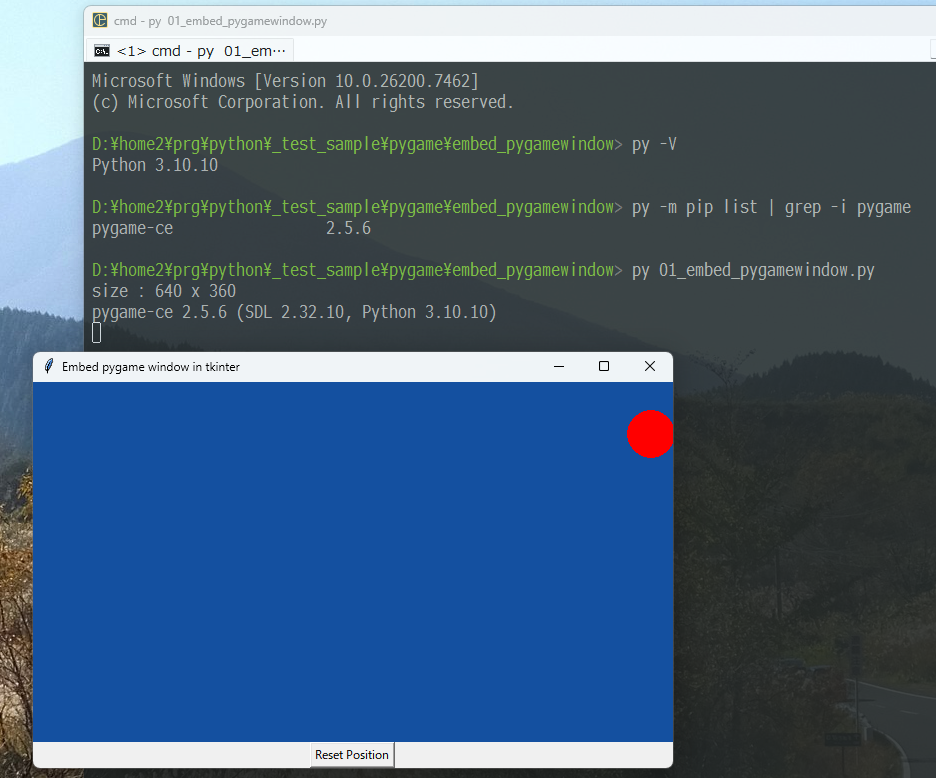
pygame-ce 2.5.6 でも、SDL_WINDOWID が機能している。tkinter で作成されたウインドウの位置を動かしても追従してくるので、tkinter のフレームの子ウインドウとして pygame ウインドウが作成されているのだろう。たぶん。
自分も昔、tkinter で作ったウインドウ内のフレームに pygameのウインドウを埋め込めるか試していたので、そのスクリプトをそのまま使って確認した。環境は、Windows10 x64 22H2 + Python 3.10.10 + tkinter + pygame-ce 2.5.6。
_mieki256's diary - tkinterの中にpygameを埋め込む
ググった感じでは、SDL_WINDOWID の動作確認用サンプルスクリプトとして、tkinter で作ったウインドウ内に pygame のウインドウを埋め込む形が多いっぽい。おそらく以下の理由があるのだろう。
- tkinter なら作成したフレームその他のウインドウハンドルを取得することが容易にできるので都合がいい。
- この機能の利用事例としては、複雑なUIをGUI用ライブラリで構築しておいて、動作結果を pygame で表示することが想定されているのだろう。
さておき。実行した結果は以下。
pygame-ce 2.5.6 でも、SDL_WINDOWID が機能している。tkinter で作成されたウインドウの位置を動かしても追従してくるので、tkinter のフレームの子ウインドウとして pygame ウインドウが作成されているのだろう。たぶん。
◎ 注意点 :
一見サポートしてるように見えるけれど、こうして埋め込んだ pygame のウインドウにはキーボードイベントを取得できない等の不具合も残っているらしい。
_Support `SDL_WINDOWID` by yunline - Pull Request #1953 - pygame-community/pygame-ce
マウスイベントやウインドウイベントは取得できるけど、キーボードイベントは取得できないと報告されているように見える。ただ、2行ほどスクリプトに追加したら問題解決したとも報告されているようで…。
でもまあ、これで pygame 1.9.6 の頃と同じように動かせるのはありがたい。例えば Windowsのスクリーンセーバのように、ウインドウハンドルを渡されてそこに描画しろと言われても pygame だけで対応できる。かなり助かる…はず。
これで、「SDL_WINDOWID は pygame 1.9.6 + Python 3.8 までしか使えない」なんて注意書きを一々残さなくても済むようになった。現行版の python + pygame でも SDL_WINDOWID は使える。ありがたや。
_Support `SDL_WINDOWID` by yunline - Pull Request #1953 - pygame-community/pygame-ce
マウスイベントやウインドウイベントは取得できるけど、キーボードイベントは取得できないと報告されているように見える。ただ、2行ほどスクリプトに追加したら問題解決したとも報告されているようで…。
でもまあ、これで pygame 1.9.6 の頃と同じように動かせるのはありがたい。例えば Windowsのスクリーンセーバのように、ウインドウハンドルを渡されてそこに描画しろと言われても pygame だけで対応できる。かなり助かる…はず。
これで、「SDL_WINDOWID は pygame 1.9.6 + Python 3.8 までしか使えない」なんて注意書きを一々残さなくても済むようになった。現行版の python + pygame でも SDL_WINDOWID は使える。ありがたや。
◎ 関連ページ :
_Support `SDL_WINDOWID` by yunline - Pull Request #1953 - pygame-community/pygame-ce
_Support SDL_WINDOWID - Issue #1943 - pygame-community/pygame-ce
_Add "from_existing_window" function to the _sdl2.Window by yunline - Pull Request #1837 - pygame-community/pygame-ce
_Using 'SDL_WINDOWID' does not embed pygame display correctly into another application (1574) - Issue #887 - pygame-community/pygame-ce
_Issue with running pygame2.0 in Sugar desktop (3696) - Issue #1820 - pygame-community/pygame-ce
_Add `hwnd` parameter to display.set_mode() by yunline - Pull Request #1957 - pygame-community/pygame-ce
_Using 'SDL_WINDOWID' does not embed pygame display correctly into another application - Issue #1574 - pygame/pygame
_"SDL_CreateWindowFrom" in "display" module by Rabbid76 - Pull Request #2981 - pygame/pygame
_class method "from_foreign_window" added to class "Window" by Rabbid76 - Pull Request #2982 - pygame/pygame
_python - tkinter and pygame do not want to work in one window - Stack Overflow
_python - Embedding a Pygame window into a Tkinter or WxPython frame - Stack Overflow
_python - Draw a circle in Pygame using Tkinter - Stack Overflow
_python - interrupting embedded pygame in tkinter skips KEYUP events and thinks the key is still pressed - Stack Overflow
_python - I'm embedding a pygame window into Tkinter, how do I manipulate the pygame window? - Stack Overflow
_python - Tkinter embed Graphical subprocess - Stack Overflow
_Python 3 - Tkinter メインウィンドウを表示する
_Support SDL_WINDOWID - Issue #1943 - pygame-community/pygame-ce
_Add "from_existing_window" function to the _sdl2.Window by yunline - Pull Request #1837 - pygame-community/pygame-ce
_Using 'SDL_WINDOWID' does not embed pygame display correctly into another application (1574) - Issue #887 - pygame-community/pygame-ce
_Issue with running pygame2.0 in Sugar desktop (3696) - Issue #1820 - pygame-community/pygame-ce
_Add `hwnd` parameter to display.set_mode() by yunline - Pull Request #1957 - pygame-community/pygame-ce
_Using 'SDL_WINDOWID' does not embed pygame display correctly into another application - Issue #1574 - pygame/pygame
_"SDL_CreateWindowFrom" in "display" module by Rabbid76 - Pull Request #2981 - pygame/pygame
_class method "from_foreign_window" added to class "Window" by Rabbid76 - Pull Request #2982 - pygame/pygame
_python - tkinter and pygame do not want to work in one window - Stack Overflow
_python - Embedding a Pygame window into a Tkinter or WxPython frame - Stack Overflow
_python - Draw a circle in Pygame using Tkinter - Stack Overflow
_python - interrupting embedded pygame in tkinter skips KEYUP events and thinks the key is still pressed - Stack Overflow
_python - I'm embedding a pygame window into Tkinter, how do I manipulate the pygame window? - Stack Overflow
_python - Tkinter embed Graphical subprocess - Stack Overflow
_Python 3 - Tkinter メインウィンドウを表示する
*1: 正確には、そのウインドウハンドルを持ったウインドウを親として、子ウインドウを作成してそこに描画する、という処理なのだと思う。たぶん。
[ ツッコむ ]
以上です。