2025/10/26(日) [n年前の日記]
#1 [tkinter][python] Pythonのqueueやthreadingを勉強中その2
_昨日
に引き続き実験中。tkinter を使ったスクリプトで重い処理をする際、ttk.Progressbar で処理の進み具合を表示したい。queue や threading を利用して、ちゃんとしている処理を書きたい。
昨日もメモしたけれど、以下のような処理にする。
サンプルは以下のような感じになった。これで合ってるのかな…?

_03_ttk_progressbar_03_use_queue.py
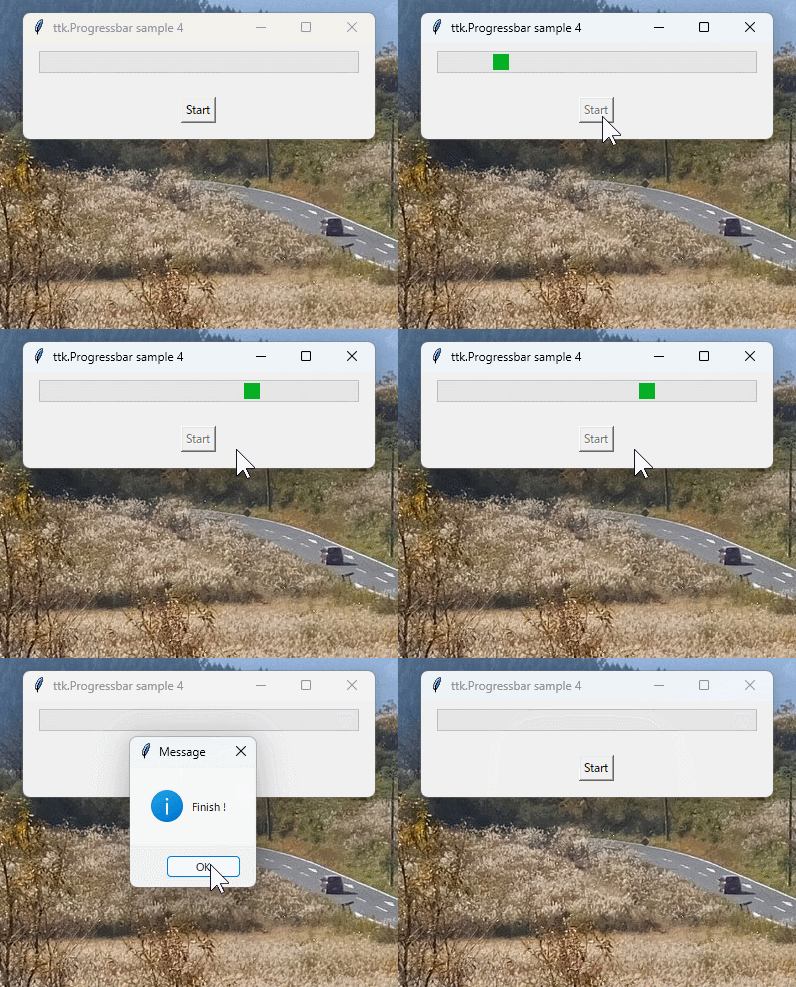
_04_ttk_progressbar_04_use_queue.py
只のサンプルスクリプトなのに、コメントを入れまくったせいか長くなってしまった…。
昨日もメモしたけれど、以下のような処理にする。
- ボタンを押した時に、スレッドを作ってそちらに重い処理をさせる。threading を使う。
- その処理の中では tkinter のウィジェットを直接操作しない。
- queue を作って、tkinter のメインスレッドにやってほしいことを queue に貯めていく。
- queue の中に何か入ってるかチェック/処理する関数を一定の時間間隔で呼び出す仕組みにする。.after() を使って指定時間後に関数を呼び出すように設定する。
- ウインドウの閉じるボタンが押された時に、スレッドの後始末をしたり、.after() で指定された処理をキャンセルしたりしてからアプリを終了する。
サンプルは以下のような感じになった。これで合ってるのかな…?
◎ 確定的モード :
_03_ttk_progressbar_03_use_queue.py
"""
ttk.Progressbar sample. determinate mode.
use queue and threading

Windows11 x64 25H2 + Python 3.10.10 64bit
"""

import tkinter as tk
import tkinter.ttk as ttk
from tkinter import messagebox
import time
import queue
import threading

UPDATE_INTERVAL = 20

after_id = None
thread = None
que = None
abort_fg = False


def heavy_job(queue: queue):
    """
    重い処理

    Args:
        queue (queue): tkinterで処理したい内容を収めるキュー
    """

    for i in range(100):
        time.sleep(0.03)  # 重い処理

        # 処理を中断
        global abort_fg
        if abort_fg:
            return

        # メインスレッド側で処理したい内容を関数にしておく
        def func():
            pbvar.set(i + 1)  # プログレスバーの値を更新

        queue.put(func)  # キューに関数を収める

    # 処理終了。終了時の処理を関数にしておく
    def end_func():
        messagebox.showinfo("Message", "Finish !")  # メッセージ表示
        btn.configure(state=tk.NORMAL)  # ボタンの有効化

    queue.put(end_func)  # キューに関数を収める


def count_up_start():
    """
    ボタンを押したときの処理
    """

    btn.configure(state=tk.DISABLED)  # ボタンの無効化
    pbvar.set(0)  # プログレスバーの値を初期化

    # 別スレッドを生成して重い処理を開始
    global thread
    thread = threading.Thread(target=heavy_job, args=(que,))
    thread.start()

    # N msec後にプログレスバーの更新処理を開始
    global after_id
    after_id = root.after(UPDATE_INTERVAL, update_prgressbar)


def update_prgressbar():
    """
    プログレスバーの更新処理
    """

    global que
    while not que.empty():
        # キューから関数を取り出して実行
        func = que.get_nowait()
        func()

    # キューが空。次回の更新処理をセット
    global after_id
    after_id = root.after(UPDATE_INTERVAL, update_prgressbar)


def window_close():
    """
    ウインドウの閉じるボタンが押された時の処理
    """

    # 別スレッドに処理の中断を指示
    global abort_fg
    abort_fg = True

    # 別スレッドの処理が終了するまで待つ
    global thread
    if thread is not None:
        thread.join()
        thread = None

    # .after() 使用中なら .after_cancel(ID) で次回の呼び出しをキャンセル
    global after_id
    if after_id is not None:
        root.after_cancel(after_id)
        after_id = None

    # アプリを終了。mainloop() から抜ける
    root.quit()


# --------------------
# main

root = tk.Tk()
root.title("ttk.Progressbar sample 3")

# プログレスバーを生成
pbvar = tk.IntVar()
pb = ttk.Progressbar(root, length=320, maximum=100, mode="determinate", variable=pbvar)
pb.pack(padx=16, pady=8)

# ボタンを生成
btn = tk.Button(root, text="Start", command=count_up_start)
btn.pack(pady=16)

# キューを確保
que = queue.Queue()

# ウインドウの閉じるボタンが押された時に呼ばれる関数を指定
root.protocol("WM_DELETE_WINDOW", window_close)

root.mainloop()
◎ 不確定的モード :
_04_ttk_progressbar_04_use_queue.py
"""
ttk.Progressbar sample. indeterminate mode.
use queue and threading

Windows11 x64 25H2 + Python 3.10.10 64bit
"""

import tkinter as tk
import tkinter.ttk as ttk
from tkinter import messagebox
import time
import queue
import threading

UPDATE_INTERVAL = 20

after_id = None
thread = None
que = None
abort_fg = False


def heavy_job(queue: queue):
    """
    重い処理

    Args:
        queue (queue): tkinterで処理したい内容を収めるキュー
    """

    for i in range(100):
        time.sleep(0.03)  # 重い処理

        # 処理を中断
        global abort_fg
        if abort_fg:
            return

        # メインスレッド側で処理したい内容を関数にしておく
        def func():
            pb.step()  # プログレスバーの状態を変更

        queue.put(func)  # キューに関数を収める

    # 処理終了。終了時の処理を関数にしておく
    def end_func():
        pb.stop()
        pb.configure(mode="determinate")
        pbvar.set(0)
        messagebox.showinfo("Message", "Finish !")  # メッセージ表示
        btn.configure(state=tk.NORMAL)  # ボタンの有効化

    queue.put(end_func)  # キューに関数を収める


def count_up_start():
    """
    ボタンを押したときの処理
    """

    btn.configure(state=tk.DISABLED)  # ボタンの無効化
    pbvar.set(0)  # プログレスバーの値を初期化
    pb.configure(mode="indeterminate")
    pb.start(10)

    # 別スレッドを生成して重い処理を開始
    global thread
    thread = threading.Thread(target=heavy_job, args=(que,))
    thread.start()

    # N msec後にプログレスバーの更新処理を開始
    global after_id
    after_id = root.after(UPDATE_INTERVAL, update_prgressbar)


def update_prgressbar():
    """
    プログレスバーの更新処理
    """

    global que
    while not que.empty():
        # キューから関数を取り出して実行する
        func = que.get_nowait()
        func()

    # キューが空。次回の更新処理をセット
    global after_id
    after_id = root.after(UPDATE_INTERVAL, update_prgressbar)


def window_close():
    """
    ウインドウの閉じるボタンが押された時の処理
    """

    # 別スレッドに処理の中断を指示
    global abort_fg
    abort_fg = True

    # 別スレッドの処理が終了するまで待つ
    global thread
    if thread is not None:
        thread.join()
        thread = None

    # .after() 使用中なら .after_cancel(ID) で次回の呼び出しをキャンセル
    global after_id
    if after_id is not None:
        root.after_cancel(after_id)
        after_id = None

    # アプリを終了。mainloop() から抜ける
    root.quit()


# --------------------
# main

root = tk.Tk()
root.title("ttk.Progressbar sample 4")

# プログレスバーを生成
pbvar = tk.IntVar()
pb = ttk.Progressbar(root, length=320, maximum=100, mode="determinate", variable=pbvar)
pb.pack(padx=16, pady=8)

# ボタンを生成
btn = tk.Button(root, text="Start", command=count_up_start)
btn.pack(pady=16)

# キューを確保
que = queue.Queue()

# ウインドウの閉じるボタンが押された時に呼ばれる関数を指定
root.protocol("WM_DELETE_WINDOW", window_close)

root.mainloop()
只のサンプルスクリプトなのに、コメントを入れまくったせいか長くなってしまった…。
[ ツッコむ ]
以上です。